

Descripcion
ClickSyncr for Kit connects your forms to Kit (formerly ConvertKit), so every form submission becomes a subscriber on your Kit form: automatically, with no code.
Works with your form builder
One plugin, one Kit connection. ClickSyncr configures each form right inside the builder you already use, and it connects your forms to 20+ other email marketing platforms too.
« Kit » and « ConvertKit » are trademarks of Kit, Inc. This plugin is an independent integration and is not affiliated with, endorsed by, or sponsored by Kit, Inc.
Why you’ll love it
- Set up in minutes: paste your Kit v4 API key and you’re connected. No developers, no code.
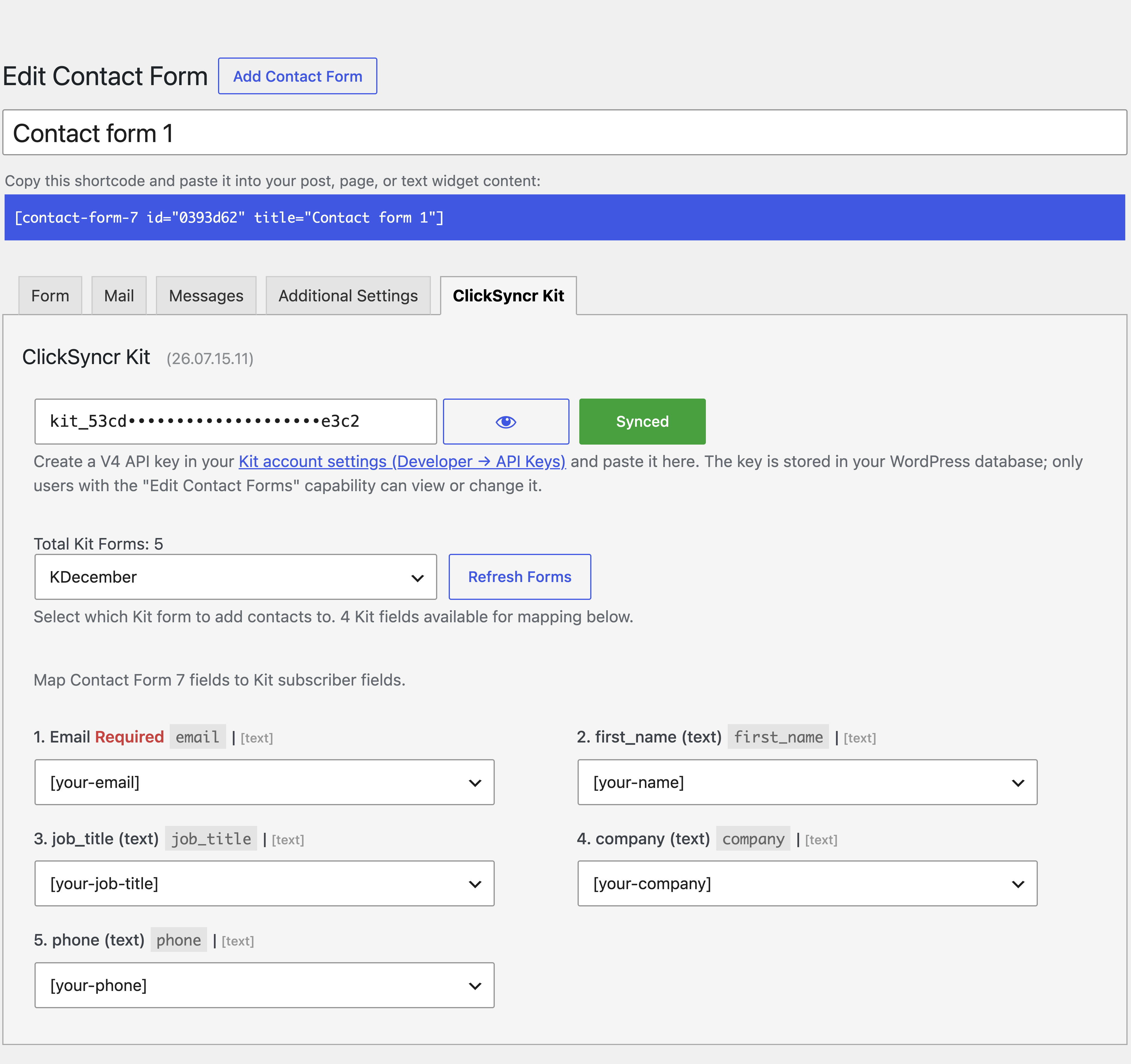
- Your Kit forms load automatically: choose which Kit form new subscribers join, right inside the form editor.
- Map any field: send first names and your Kit custom fields straight from your form.
- Built-in opt-in: add a consent checkbox and ClickSyncr adds subscribers to your Kit form when they tick it, or saves them as a subscriber only when they don’t.
- Subscriber status control: add to the Kit form or save as a subscriber only, per form.
- Honest double opt-in: your Kit form’s own setting decides whether Kit sends its confirmation email, and the plugin says so instead of pretending.
- No duplicate subscribers: Kit matches subscribers by email, so existing subscribers are updated and new ones are created, every single time.
- A setup for every form: each form can sync to a different Kit form with its own field mapping, in every supported builder.
- Sync health at a glance: an admin-bar menu shows every form’s Kit sync counts and the last error, if any.
- Lightweight and fast: built to WordPress standards, so it never slows your site down.
- You stay in control: you decide exactly what data is sent to Kit, and to which Kit form.
Learn more about the forms to Kit integration.
What you’ll need
- WordPress 6.7 or higher
- At least one supported form builder: Contact Form 7, WPForms, Gravity Forms, Ninja Forms, Fluent Forms, Formidable Forms, or Forminator
- A Kit account with a v4 API key (free accounts work)
Getting your Kit API key
- Log in to your Kit account.
- Go to Settings > Developer.
- Create a v4 API key.
- Paste it into the ClickSyncr Kit settings of any form.
Support
Need a hand? Browse the documentation, check the frequently asked questions, or contact us and we’ll be glad to help.
Kit
Connected forms send their submissions to Kit. Read more at Kit.
Screenshots
Installacion
Automatic installation
- Log in to your WordPress dashboard.
- Go to Plugins > Add New.
- Search for « ClickSyncr for Kit ».
- Click Install Now, then Activate.
Manual installation
- Download the plugin ZIP file.
- In your WordPress dashboard, go to Plugins > Add New > Upload Plugin.
- Choose the ZIP file and click Install Now.
- Activate the plugin.
After installation
- Edit any form and open its ClickSyncr Kit settings.
- Paste your Kit v4 API key, choose a Kit form, and map your fields (email is required).
- Save. Every submission now syncs to Kit automatically. Full guidance lives on the ClickSyncr for Kit page.
FAQ
-
Do I need a Kit account?
-
Yes. You’ll need an active Kit account and a v4 API key to sync your subscribers. Free Kit accounts work.
-
Does this work with ConvertKit?
-
Yes. Kit is the new name for ConvertKit, and this plugin works with the same accounts and the same v4 API keys.
-
Which form builders are supported?
-
Contact Form 7, WPForms, Gravity Forms, Ninja Forms, Fluent Forms, Formidable Forms, and Forminator. At least one of them must be installed and activated.
-
Where do I find my Kit API key?
-
Log in to Kit and go to Settings > Developer, then create a v4 API key. Each builder setup guide shows exactly where to paste it.
-
Which fields can I map?
-
Map your form fields to the subscriber’s first name and to any custom field in your Kit account. New custom fields you create in Kit appear in the mapping list automatically.
-
How does the opt-in consent field work?
-
Pick a consent field (a checkbox, acceptance, or radio) from your form. When a visitor ticks it, they are added to the Kit form you selected; if they leave it unticked, they are saved in Kit as a subscriber only, without joining the form, so no form emails or automations fire. Leave it as « None » to use the subscriber status you chose for the form.
-
Does it work with Kit double opt-in?
-
Yes, exactly the way Kit designed it: your Kit form’s own incentive-email setting decides whether new subscribers must confirm. The plugin adds subscribers through the form, and Kit sends its confirmation email only if the form has double opt-in enabled.
-
Will it create duplicate subscribers?
-
No. Kit matches subscribers by email address: existing subscribers are updated and new ones are created.
-
Can I use different settings for different forms?
-
Yes. Every form has its own ClickSyncr Kit setup, so each can sync to a different Kit form.
-
ClickSyncr for Kit Privacy
-
The plugin sends only the fields you map, and only to Kit. Nothing is collected by ClickSyncr itself. Read about our policy.
Reviews
There are no reviews for this plugin.
Contributors & Developers
“ClickSyncr for Kit – Contact Form 7, WPForms, Gravity Forms, Ninja Forms, Fluent Forms & Formidable” is open source software. The following people have contributed to this plugin.
Contributors
Interested in development?
Browse the code, check out the SVN repository, or subscribe to the development log by RSS.
Changelog
For the full changelog with details, see the release history.
26.08.14.21
Version 26.08.14.21 release notes