
Descripcion
Know who changed what on your WordPress site. Logged.ai gives you a local activity log for supported user actions, content edits, settings and WooCommerce changes, so you can investigate a problem with recorded context.
Find a change, inspect its details and open the affected item with your current permissions. History stays in your WordPress database. Free needs no vendor account, subscription or external AI service.
Try the Free and Pro demos
Real plugin screens, fictional records, no account needed. Explore screens and filters; permanent saves, message delivery and response enforcement are disabled. The Pro demo shows the separate paid add-on.
Setup guides | Reference | Support
What you can do with Free
- Review user activity. Inspect supported logins, logouts, account and role changes. Distinguish the acting and affected users without storing passwords or sensitive profile values.
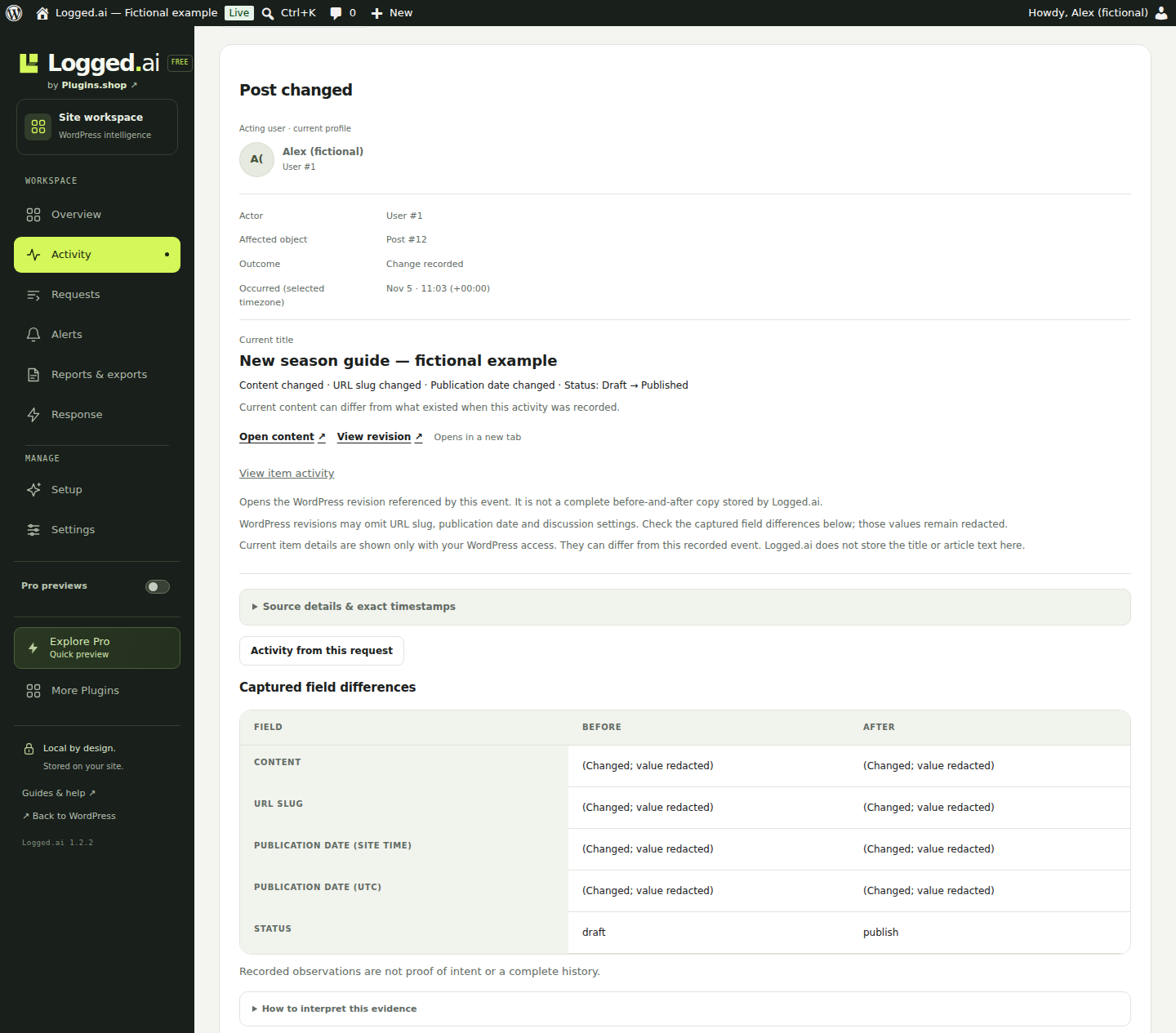
- Investigate content and settings changes. Filter activity, open accessible items and follow retained revisions. Current titles stay separate from historical evidence.
- Review WooCommerce activity. Inspect supported price, stock and order changes and stored refund facts, with recorded currencies and explicit missing values. WooCommerce is optional.
- Open an item’s history. Use shortcuts in supported content, product and order editors, including HPOS, without saving or leaving your work.
- Export your evidence. Download spreadsheet-friendly CSV or structured JSON. Request observations and retained context have a separate JSON export.
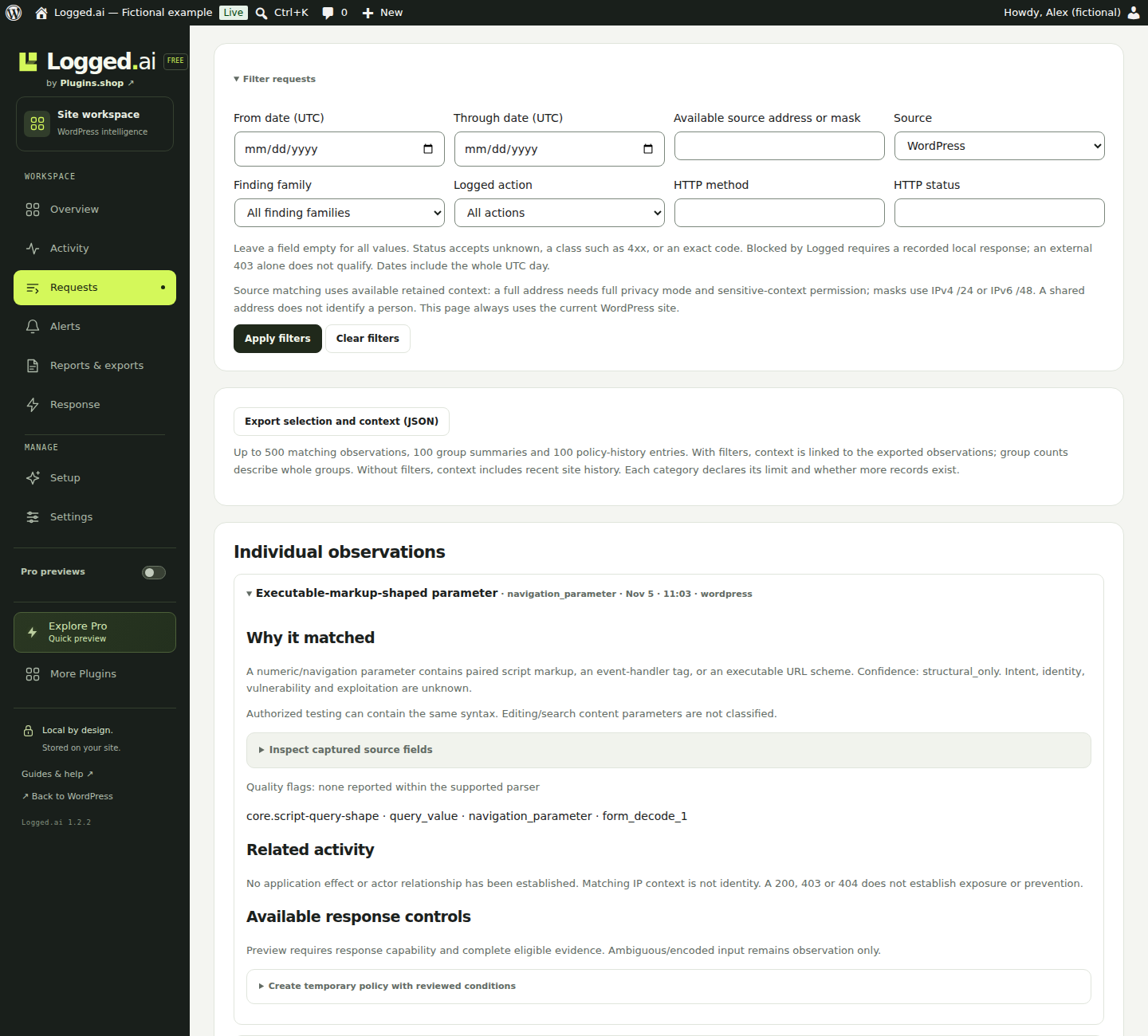
- Inspect request findings. Filter WordPress-layer observations. Preview and confirm temporary manual response policies, with expiry and recovery.
- Control privacy and retention. Configure collection and retention, use scoped views and exports, and keep critical security and failure notices in Free.
Essentials, Operator and Expert change display detail, not collection or permissions. Local Pro previews can be hidden for your administrator account.
When the Pro add-on helps
Add Pro for recurring team reviews; keep Free installed.
- Scheduled reports: reuse saved searches and schedule private reports.
- Advanced alerts: configure rules and notify your team through email, Slack or webhooks. Routine activity notification emails are a Pro feature; critical security and failure notices remain Free.
- Cases & handover: keep related evidence, notes, assignments and decisions together.
Pro requires a compatible Free installation and first licence activation. Opening a preview or tool does not enable alerts, schedules or response policies. Destinations and sending require configuration. Compare features and explore Pro.
Coverage you can understand
Supported hooks are recorded, not every database write. Direct SQL, unsupported integrations and activity while disabled can be missing. Raw content and sensitive values are excluded.
Request findings are observations, not proof of an attack. The sensor cannot see all cached, static or upstream traffic. A local response is distinct from an arbitrary HTTP 403. Equivalent PHP/database operators can change local evidence; it is not tamper-proof.
More from Plugins.shop
Optional companions from the same publisher:
- Session recording and replay — ClickClue, with visitor consent.
- Malware scanner — Shieldlume Security by Antivirus.ai.
- WooCommerce checkout session replay — Frictions, for checkout investigations.
- Contact form builder — KillerConversions.
- Custom fields and custom post types — CustomFields.
- FAQ accordion and product FAQs — CatalogFAQ.
- Announcement and notification bars — CampaignBars.
- WooCommerce checkout field editor — Cartdini.
- WooCommerce minimum order and quantity limits — OrderFloor.
- WooCommerce cost of goods and profit reports — OrderWorth.
- WooCommerce inventory management — StockControls.
These are separate products, not dependencies or automatic integrations. Check their pages for availability and requirements. The local More Plugins page installs nothing and sends no usage data.
Screenshots



Installacion
- Install and activate Logged.ai from Plugins > Add New, or upload the Free plugin ZIP.
- Open Logged.ai > Setup and review collection, retention and request-address settings.
- Make a supported test change and inspect it in Activity. Use the built-in request observation check to understand the sensor’s coverage.
- Configure optional notices or response policies only after reviewing their scope and recipients.
Requires WordPress 7.0+, PHP 8.0+ and MySQL or MariaDB through the standard WordPress database adapter. InnoDB is required for protected exports and privacy changes, including the relevant WordPress options table. SQLite and WordPress Playground’s SQLite database are unsupported; Logged.ai opens paused diagnostics rather than creating its tables. It does not convert tables automatically.
Background exports and cleanup need working WordPress scheduling. PHP 8.0/8.1 must allow exception-argument capture to be disabled; otherwise activation/loading pauses with guidance. PHP 8.2+ uses native sensitive-parameter redaction.
Back up your database before updating. Replace plugin files without uninstalling; use matched Free and Pro packages when using the add-on. Details are in docs/technical-reference.txt and the export guide.
FAQ
-
Does Free need an account or a licence?
-
No. Free works independently. Routine activity emails, configurable team alerts, scheduled reports and cases require the separate Pro add-on.
-
Does the .ai name mean my activity is sent to an AI service?
-
No. Local collection sends no activity data to Logged.ai or an AI service. Local initials replace external profile images. Notices use your WordPress mail service; mail acceptance does not prove delivery. Product links contact external sites only when followed.
-
What can I export, and does it need PHP Sodium?
-
Download now creates CSV/JSON in memory: up to 1,000 records and 2 MiB. Oversized selections are refused, never silently truncated. It needs no Sodium, temporary directory or cron, but requires supported database locking and current authorization.
Prepared activity exports use encrypted database chunks and background jobs, require PHP Sodium and working scheduling, and expire after 24 hours. Limits are 1,000,000 rows and 256 MiB, not a performance guarantee. Personal-data export jobs use this saved mechanism. Keep the original WordPress authentication salts to read saved exports. New saved chunks do not require Unix filesystem permissions; legacy file chunks still need their original compatible storage until cleanup completes.
Separate request JSON includes up to 500 observations, 100 groups and 100 policy-history entries, with caps disclosed. It is not a complete traffic log or atomic snapshot. Date filters use UTC. Secure plaintext downloads: local copies cannot be recalled.
-
What data is retained?
-
Approved identifiers, change facts and UTC timestamps are stored locally. Administrative collectors exclude passwords, raw content and sensitive profile values. Request addresses default to masked direct peers; full addresses require explicit selection and permissions. Forwarded headers are ignored unless you configure a trusted proxy boundary.
Defaults are 90 days for activity, 7 for minimized requests, 30 for groups/inactive response history and 14 for explicitly selected exact addresses. Cleanup may be delayed by cron; current privacy restrictions still apply to viewing and exports. Personal-data erasure removes associated events and linked addresses.
-
Can I use it on a multisite network?
-
Site views are permission-scoped. Network exports need separate authorization. Ordinary site exports and erasure cannot include another site’s evidence.
-
What happens if I deactivate or uninstall?
-
Deactivation preserves data. Uninstall also preserves it unless the separately confirmed installation-wide delete option is enabled. That option removes Logged.ai-owned data, settings, jobs and capabilities. Previously downloaded files remain outside the plugin’s control.
Reviews
There are no reviews for this plugin.
Contributors & Developers
“Logged.ai – Activity Log & Audit Trail” is open source software. The following people have contributed to this plugin.
Contributors
Translate “Logged.ai – Activity Log & Audit Trail” into your language.
Interested in development?
Browse the code, check out the SVN repository, or subscribe to the development log by RSS.
Changelog
1.2.1
- Group everyday tools before Setup and Settings, followed by optional Pro discovery.
- Add compact local Pro previews with a persistent per-administrator show/hide switch.
- Add a local More Plugins page and Plugins.shop attribution within the plugin workspace.
- Preserve existing collection, data, permissions, alerts and Pro activation behavior.
1.2.0
- Establish the revised launch Free/Pro split; retain stored data and existing licence terms.
Earlier history is included in docs/changelog.txt. Website release notes.